Follow the steps below. Tap a step to open it.
Step 1
To activate developer mode on your Roku device, follow these steps:
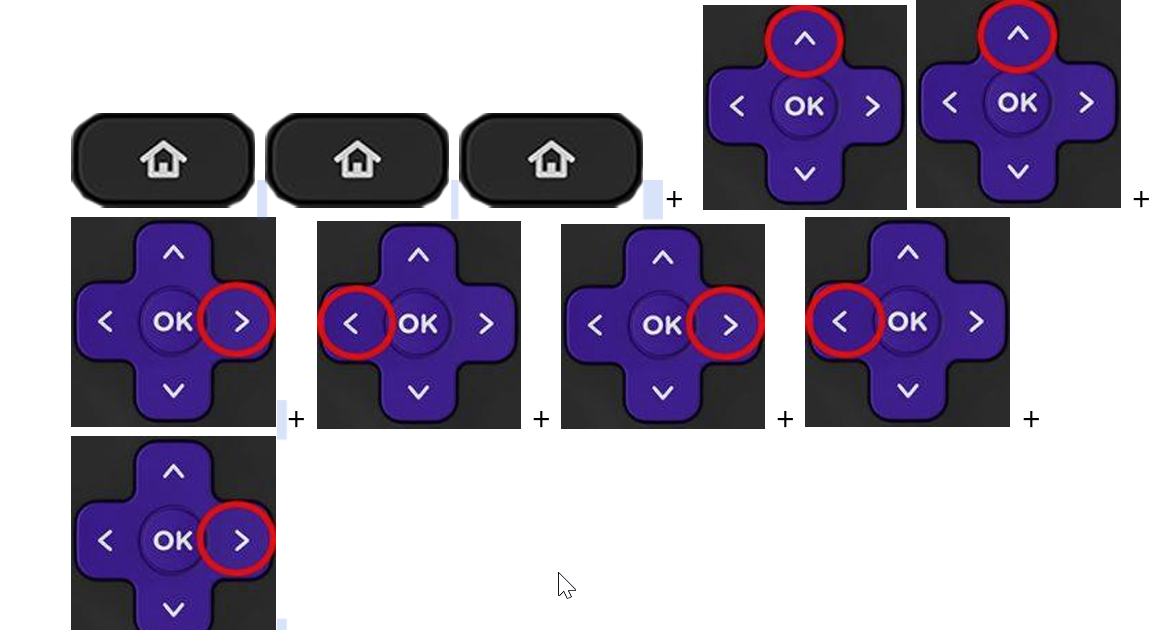
Use your Roku remote or the Roku remote app and press Home three times, Up twice, then Right, Left, Right, Left, Right.
Step 2
Install this APK file from this link on your Android phone: https://tinyurl.com/3watfmuf
DO NOT OPEN THE APP YET
Step 3
Make sure that your Android phone and your Roku device are connected to the same network.
Step 4
Now you can open the app and press Install in the app.
Step 5
Login with Code.
Code: 9HDL7R
Enter the username and password provided to you by email or on this panel.
If you have any issues, please do not hesitate to contact us by putting a ticket in the billing portal.